> ## Documentation Index
> Fetch the complete documentation index at: https://zolinthecow.mintlify.site/llms.txt
> Use this file to discover all available pages before exploring further.
# Quickstart
> Get started in a few commands
## Installation
First, install enochian.
```bash pnpm theme={null}
pnpm i enochian-js enochian-studio
```
```bash npm theme={null}
npm i enochian-js enochian-studio
```
Enochian supports both sglang backends and OpenAI compatible endpoints. To use it with OpenAI, intialize a `ProgramState` using the `OpenAIBackend`.
```typescript theme={null}
import ProgramState from 'enochian-js';
const s = new ProgramState().fromOpenAI();
```
If you have access to a GPU and would like to use a local model, install and launch an [sglang](https://github.com/sgl-project/sglang) server:
```bash theme={null}
pip install "sglang[all]"
pip install flashinfer -i https://flashinfer.ai/whl/cu121/torch2.4/
python -m sglang.launch_server \
--model-path meta-llama/Meta-Llama-3-8B-Instruct \
--port 30000
```
We're now ready to use enochian.
```typescript theme={null}
import ProgramState from 'enochian-js';
async function multiTurnQuestion(
s: ProgramState,
question1: string,
question2: string,
): Promise<[string | undefined, string | undefined]> {
// If SGLang
await s.fromSGL('http://localhost:30000');
// If OpenAI
// s.fromOpenAI({ modelName: 'gpt-4o-mini' });
await s
.add(s.system`You are a helpful assistant.`)
.add(s.user`${question1}`)
.add(s.assistant`${s.gen('answer1')}`);
await s
.add(s.user`${question2}`)
.add(s.assistant`No problem! ${s.gen('answer2')}`);
console.log(s.get('answer1'), s.get('answer2'));
return [s.get('answer1'), s.get('answer2')];
}
const s = new ProgramState();
multiTurnQuestion(s, 'Tell me a joke', 'Tell me a better one');
```
You can build arbitrarily complex logic in your workflows. Enochian maintains the state of your LLM calls as your javascript executes, so as long as it's programmable in javascript Enochian can execute it.
## Prompt Studio
You can optionally run it with Enochian Studio as well, a web view for the prompts being sent in. First, start the server.
```bash pnpm theme={null}
pnpm exec enochian studio
```
```bash npm theme={null}
npm enochian studio
```
Now, add a line where you want to start logging to set the debug info.
```typescript theme={null}
import ProgramState from 'enochian-js';
async function multiTurnQuestion(
s: ProgramState,
question1: string,
question2: string,
): Promise<[string | undefined, string | undefined]> {
await s.fromSGL('http://localhost:30000');
// ADD THIS
s.beginDebugRegion({
debugName: 'multiTurnQuestion',
});
await s
.add(s.system`You are a helpful assistant.`)
.add(s.user`${question1}`)
.add(s.assistant`${s.gen('answer1')}`);
await s
.add(s.user`${question2}`)
.add(s.assistant`No problem! ${s.gen('answer2')}`);
console.log(s.get('answer1'), s.get('answer2'));
return [s.get('answer1'), s.get('answer2')];
}
const s = new ProgramState();
multiTurnQuestion(s, 'Tell me a joke', 'Tell me a better one');
```
Now, let's run our multiturn question and head over to [http://localhost:56765](http://localhost:56765).
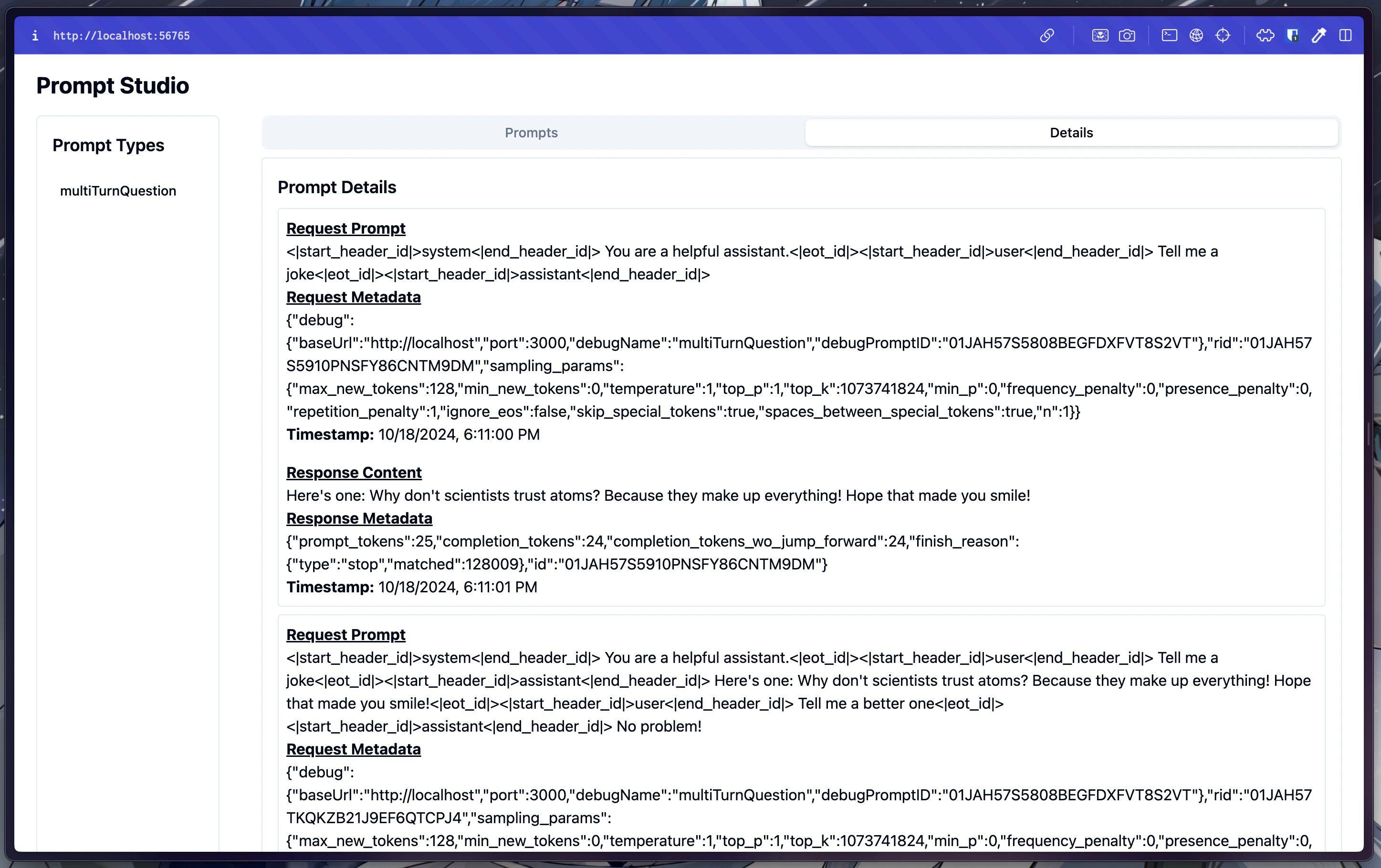 You should see the prompt you just submitted in the "multiTurnQuestion" section. We can see that under the hood, enochian applied the Llama-3 chat template to the prompt along with some default sampling params. We can also see the response, along with the metadata associated with it.
This is all you need to do to get started writing advanced workflows for your application!
You should see the prompt you just submitted in the "multiTurnQuestion" section. We can see that under the hood, enochian applied the Llama-3 chat template to the prompt along with some default sampling params. We can also see the response, along with the metadata associated with it.
This is all you need to do to get started writing advanced workflows for your application!