
Installation

First, install enochian.
pnpm i enochian-js enochian-studio
Enochian supports both sglang backends and OpenAI compatible endpoints. To use it with OpenAI, intialize a ProgramState using the OpenAIBackend.
import ProgramState from 'enochian-js';

const s = new ProgramState().fromOpenAI();
If you have access to a GPU and would like to use a local model, install and launch an sglang server:
pip install "sglang[all]"
pip install flashinfer -i https://flashinfer.ai/whl/cu121/torch2.4/

python -m sglang.launch_server \
    --model-path meta-llama/Meta-Llama-3-8B-Instruct \
    --port 30000
We’re now ready to use enochian.
import ProgramState from 'enochian-js';

async function multiTurnQuestion(
    s: ProgramState,
    question1: string,
    question2: string,
): Promise<[string | undefined, string | undefined]> {
    // If SGLang
    await s.fromSGL('http://localhost:30000');
    // If OpenAI
    // s.fromOpenAI({ modelName: 'gpt-4o-mini' });
    await s
        .add(s.system`You are a helpful assistant.`)
        .add(s.user`${question1}`)
        .add(s.assistant`${s.gen('answer1')}`);
    await s
        .add(s.user`${question2}`)
        .add(s.assistant`No problem! ${s.gen('answer2')}`);
    console.log(s.get('answer1'), s.get('answer2'));
    return [s.get('answer1'), s.get('answer2')];
}

const s = new ProgramState();
multiTurnQuestion(s, 'Tell me a joke', 'Tell me a better one');
You can build arbitrarily complex logic in your workflows. Enochian maintains the state of your LLM calls as your javascript executes, so as long as it’s programmable in javascript Enochian can execute it.

Prompt Studio

You can optionally run it with Enochian Studio as well, a web view for the prompts being sent in. First, start the server.
pnpm exec enochian studio
Now, add a line where you want to start logging to set the debug info.
import ProgramState from 'enochian-js';

async function multiTurnQuestion(
    s: ProgramState,
    question1: string,
    question2: string,
): Promise<[string | undefined, string | undefined]> {
    await s.fromSGL('http://localhost:30000');

    // ADD THIS
    s.beginDebugRegion({
        debugName: 'multiTurnQuestion',
    });

    await s
        .add(s.system`You are a helpful assistant.`)
        .add(s.user`${question1}`)
        .add(s.assistant`${s.gen('answer1')}`);
    await s
        .add(s.user`${question2}`)
        .add(s.assistant`No problem! ${s.gen('answer2')}`);
    console.log(s.get('answer1'), s.get('answer2'));
    return [s.get('answer1'), s.get('answer2')];
}

const s = new ProgramState();
multiTurnQuestion(s, 'Tell me a joke', 'Tell me a better one');
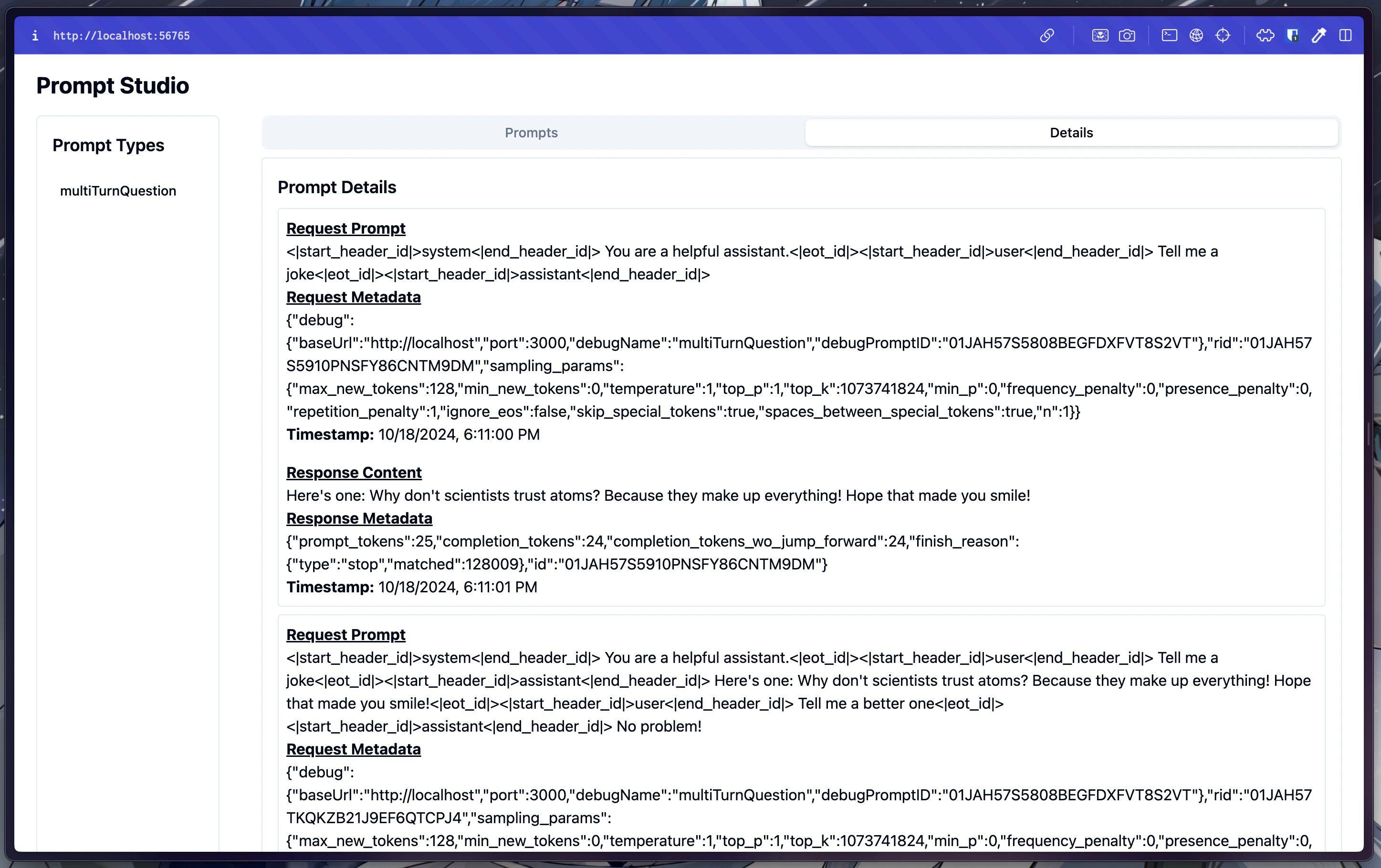
Now, let’s run our multiturn question and head over to http://localhost:56765. You should see the prompt you just submitted in the “multiTurnQuestion” section. We can see that under the hood, enochian applied the Llama-3 chat template to the prompt along with some default sampling params. We can also see the response, along with the metadata associated with it. This is all you need to do to get started writing advanced workflows for your application!